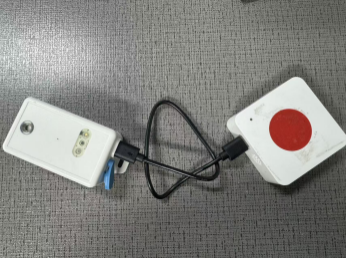
Upgrade LHT65N Firmware via PB01
1、Preliminary Tools
USB-TTL Adapter
Device Serial Cable
TremoProgrammer
PB01 Node
LHT65N Node
Compiled LHT65N Firmware(If you need to use this feature, please contact us, as this firmware requires special processing.)
2. Set PB01 to flashing mode.
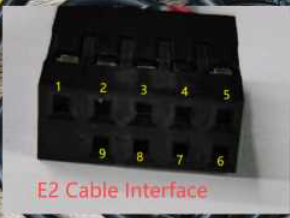
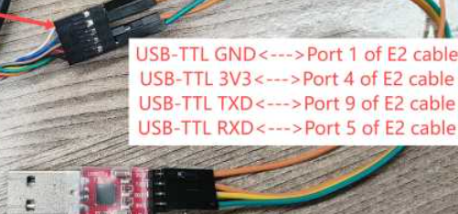
- Use TremoProgrammer to flash the LHT65N firmware onto PB01. Select the serial port and baud rate (921600), select the firmware (address 0x08000000), and click Start to begin flashing.
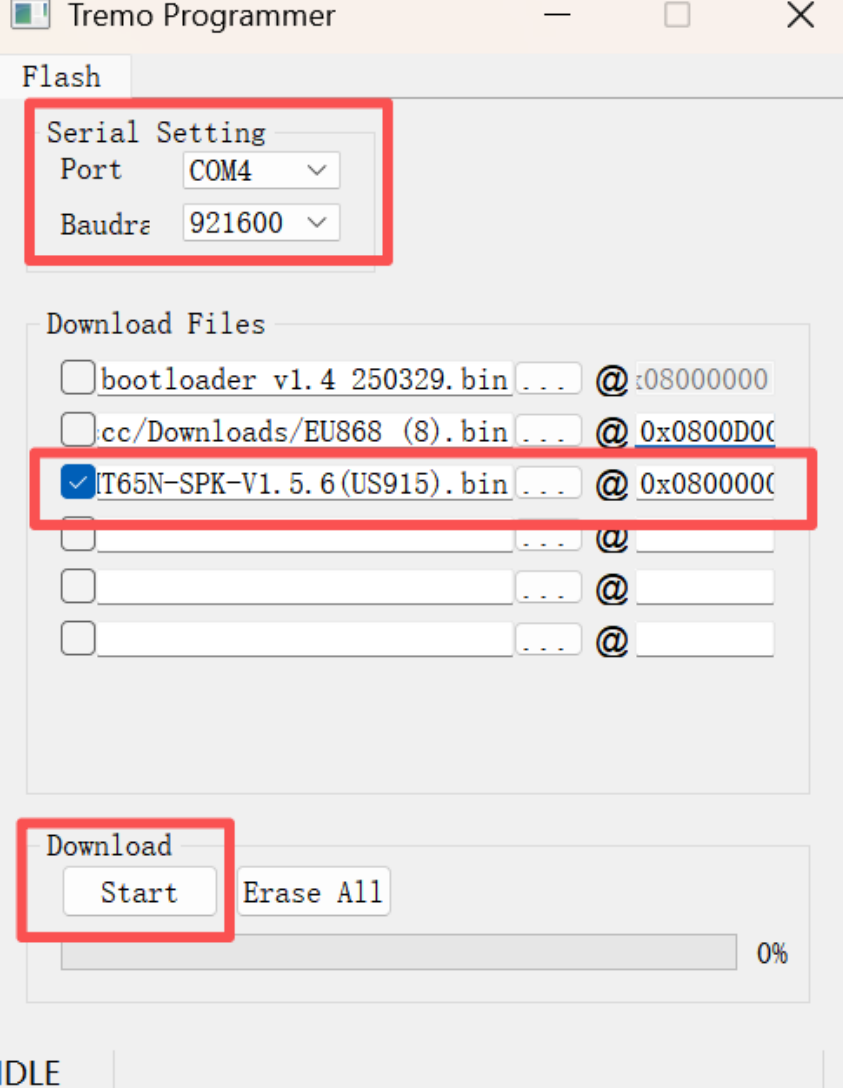
- After successful flashing, remove the PB01 battery to discharge it, then reinstall the battery and power on to enter working mode.
5.Connect the LHT65N and PB01 using a data cable. First, press the reset button on the LHT65N for 5 seconds to restart the device. Then, press the PB01 button for 5 seconds to enter flashing mode. The PB01 will then flash its firmware into the LHT65N device. (The PB01 will flash blue frequently during the flashing process.) A green light and beep indicate successful flashing.